


TheDivergence
Version 0.1.4
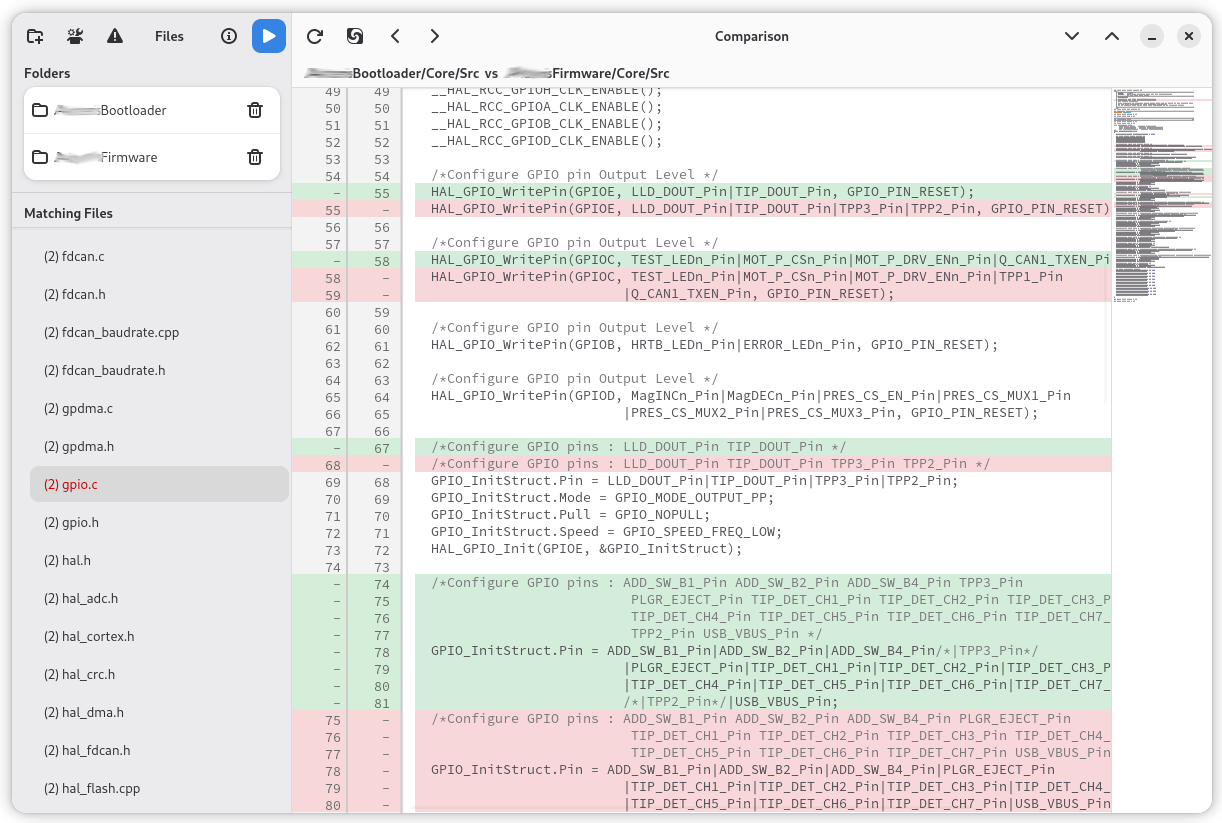
Find files with the same name across multiple folders and compare them with a unified diff view.
Features
Multi-Folder File Scanning
Recursively scans multiple folders for files matching the same name. Glob pattern filtering (*.cpp, *.h, etc.) to focus on relevant files.
Unified Diff View
LCS-based comparison with whitespace-agnostic matching. Added lines shown in green, removed in red, with word-level highlighting within changed lines.
Syntax Highlighting
GtkSourceView 5 provides automatic language detection for 300+ programming languages. Adwaita theme auto-switches with light/dark mode.
Dual-Column Line Numbers
Custom Cairo-rendered line numbers showing both left and right file line numbers. Added/removed lines clearly marked with colored backgrounds.
Minimap Navigation
GtkSource::Map sidebar for quick navigation through large files. Diff colors visible in the minimap.
Meld Integration
Open any file pair in Meld for external diff viewing. Copy files between folders with confirmation dialogs.
CLI Interface
Launch from the command line with folders and pattern files: compare-sparse-files [-p PATTERNS_FILE] [FOLDER...]
Use Cases
Comparing Multiple Code Versions
Point to two or more versions of a source repository to see which files differ and review changes across all matching files.
Reconciling Configuration Files
Compare config directories across multiple servers or environments to find and fix inconsistencies.
Synchronizing Project Structures
Find diverging files across similar project structures and use the copy buttons to synchronize them.
Tracking Duplicated Code
Identify where duplicated codebases have drifted apart. The diff-only filter shows only files with differences.
User Manual
Quick Start
- Launch TheDivergence from GNOME Activities or terminal
- Click Add Folder to add two or more directories to compare
- Optionally set glob patterns to filter file types (e.g.,
*.cpp,*.h) - Click Compare to scan and find matching files
- Click a file in the list to see its diff
- Files with differences are highlighted in red
Main Window Layout
Two-pane layout with Adw::NavigationSplitView:
Sidebar (left):
- Toolbar: Add Folder, Set Patterns, Diff-only toggle, Compare, About
- Folder list with remove buttons
- Matching files list (files found in 2+ folders)
- Files with differences highlighted in red
- Diff-only toggle filters to show only changed files
Diff Viewer (center):
- Header showing "FolderA/file vs FolderB/file"
- Reload, Open in Meld, Copy Left→Right / Copy Right→Left buttons
- Next/Previous difference navigation with wrap-around
- Pair combo when file exists in 3+ folders
- GtkSourceView with syntax highlighting, bracket matching, line highlighting
- Dual-column line numbers (left file / right file)
- Minimap sidebar
Diff Algorithm
- LCS (Longest Common Subsequence) based comparison
- Iterative backtracking — no deep recursion
- Handles Windows (\r\n) and Unix (\n) line endings
- Whitespace-agnostic: lines differing only in leading/trailing spaces are treated as identical
- Word-level diff: highlights changed words within removed→added line pairs
Visual indicators:
- Added lines: pale green background, "-" in left column
- Removed lines: pale red background, "-" in right column
- Changed words: darker highlight within added/removed lines
- Auto light/dark theme adaptation
CLI Usage
# GUI mode
compare-sparse-files

# Compare specific folders
compare-sparse-files /path/to/folder_a /path/to/folder_b

# With patterns file
compare-sparse-files -p patterns.txt /path/to/folder_a /path/to/folder_b
The patterns file contains one glob pattern per line. Lines starting with # are comments.
File Operations
- Reload: Re-reads files from disk and refreshes the diff view
- Open in Meld: Launches Meld with the current file pair for external diff viewing
- Copy Left→Right: Copies the left file to the right folder (with confirmation)
- Copy Right→Left: Copies the right file to the left folder (with confirmation)
- Next/Previous: Navigate between diff hunks with wrap-around