

TheCortexMDiff
Version 0.2.0
ARM Cortex-M firmware comparison tool — disassemble, diff, and analyze firmware changes.
Features
Automatic File Format Detection
Detects ELF, Intel HEX, and raw binary formats from file content, not extensions. Load .elf, .hex, .ihex, .bin, .axf, .o, or .out files.
Selectable Instruction Set
Cortex-M (Thumb), Auto-detect, or ARM mode. Controls how arm-none-eabi-objdump interprets the binary. Changing the selection re-disassembles both files.
Multiple Diff Algorithms
Default (Myers), Minimal (precise but slower), and Speed (optimized for large files with 100k+ lines). Select the right tradeoff for your firmware size.
3-Mode Address Stripping
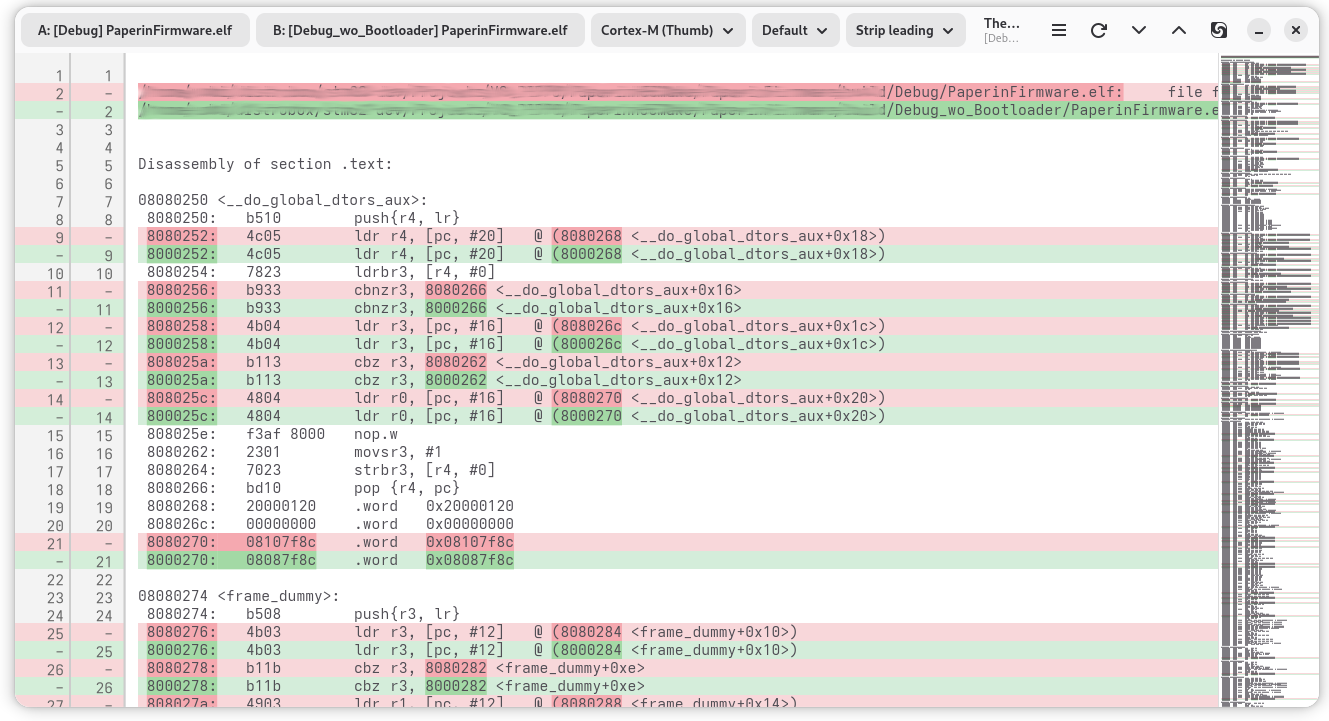
No stripping, strip leading addresses, or strip all addresses (including inline branch targets and .word data). Reduces false diffs when comparing firmware at different base addresses.
Syntax-Highlighted Diff View
GtkSourceView-powered unified diff with word-level change highlighting. Added lines in green, removed in red, with context lines for orientation.
Async Disassembly
Disassembly and diff run asynchronously with a spinner and cancellation support. The UI stays responsive even for large firmware images.
Drag and Drop
Drop two files to load both at once, or drop a single file on the left/right half of the window. Also supports command-line arguments.
Meld Integration
Export the current disassembly to temporary files and open in Meld for full-featured external comparison with Ctrl+M.
Use Cases
Comparing Firmware Builds
Compare two firmware builds to verify that compiler changes, flag adjustments, or source modifications produce the expected disassembly differences.
Bootloader Relocation Analysis
Compare firmware built with and without a bootloader offset. Address stripping eliminates false diffs from different base addresses, showing only real code changes.
Compiler Optimization Comparison
Compare the same source compiled with -O2 vs -O3 to analyze how optimization levels affect generated ARM Thumb instructions.
Firmware Patch Verification
Load original and patched firmware to verify exactly which instructions changed. The diff view highlights modifications at the instruction level.
CI/CD Firmware Validation
Compare firmware artifacts from different CI pipeline runs to detect unexpected changes in the generated binary.
User Manual
Quick Start
- Launch TheCortexMDiff from GNOME Activities or terminal
- Click File A to open the first firmware file
- Click File B to open the second firmware file
- Disassembly and comparison start automatically
- Use Ctrl+D / Ctrl+Shift+D to jump between differences
From the command line:
the-cortexmdiff firmware_v1.elf firmware_v2.elf
Opening Files
There are three ways to load firmware files:
- Buttons: Click "File A" or "File B" in the header bar. The filter defaults to firmware extensions (
.elf,.hex,.ihex,.bin,.axf,.o,.out). - Drag and drop: Drop two files to load both at once, or drop a single file on the left half (File A) or right half (File B).
- Command line:
the-cortexmdiff file_a.elf file_b.elf
When both files are loaded, disassembly and comparison start automatically.
Supported File Formats
| Format | Extensions | Detection |
|---|---|---|
| ELF | .elf, .axf, .o, .out | Magic bytes \x7FELF |
| Intel HEX | .hex, .ihex | First byte : |
| Raw binary | .bin | Fallback for all other files |
File format is auto-detected from content, not from the file extension.
Instruction Set
The instruction set dropdown controls how arm-none-eabi-objdump interprets the binary:
| Mode | Description |
|---|---|
| Cortex-M (Thumb) | Forces Thumb decoding (-M force-thumb). Default, correct for all Cortex-M cores. |
| Auto-detect | No -M flag. Lets objdump decide from ELF metadata. Useful for mixed ARM/Thumb ELFs. |
| ARM | Forces ARM decoding (-M no-force-thumb). Use for ARM7/ARM9 firmware. |
Changing the selection re-disassembles both files and re-runs the diff.
Diff Algorithm
The diff algorithm dropdown selects the GNU diff strategy:
| Algorithm | Description |
|---|---|
| Default | Standard Myers O(ND) algorithm (diff -u). Best for most cases. |
| Minimal | Guarantees minimal edit distance (diff -u -d). Slower but more precise. |
| Speed (large files) | Optimised heuristic for large files (diff -u --speed-large-files). Use for very large disassemblies (100k+ lines). |
Address Stripping
When comparing firmware built at different base addresses, every line differs because hex addresses change. Address stripping controls how addresses are handled during comparison:
| Mode | What it strips | When to use |
|---|---|---|
| No stripping | Nothing. Lines compared as-is. | Comparing identical base addresses. |
| Strip leading | Removes the hex address prefix at the start of each line. | Most firmware comparisons where only the base address differs. |
| Strip all | Strips leading addresses plus inline addresses: branch targets, annotations, .word data, and 0x-prefixed values. | Maximum noise reduction when builds differ only in link-time addresses. |
The original lines (with addresses) are always displayed in the diff view; stripping only affects what is considered "equal" during comparison.
Keyboard Shortcuts
| Shortcut | Action |
|---|---|
Ctrl+O | Open File A |
Ctrl+Shift+O | Open File B |
Ctrl+D | Jump to next difference |
Ctrl+Shift+D | Jump to previous difference |
F5 | Reload (re-disassemble and diff) |
Ctrl+M | Open current disassembly in Meld |
Troubleshooting
| Problem | Solution |
|---|---|
| "arm-none-eabi-objdump not found" | Install: sudo dnf install arm-none-eabi-binutils-cs |
| "Could not detect file format" | File may be empty or corrupted. Check with file <path>. |
| Too many false diffs | Switch address stripping to "Strip leading" or "Strip all". |
| Diff takes too long | Switch diff algorithm to "Speed (large files)". |
| Meld button greyed out | Load both files and wait for the diff to complete first. |