

TheCosmicWall
Version 0.1.0
Deep space image explorer and multi-monitor desktop wallpaper composer for GNOME.
Features
9 Astronomy Image Sources
NASA APOD (daily curated picture), NASA Image Library (140,000+ searchable images), JWST (Webb), Artemis II, ESA/Hubble, ESO (VLT, ALMA, ELT), NOIRLab (Gemini, Rubin), Chandra X-ray Observatory, and NASA EPIC (Earth from L1).
Thumbnail Gallery
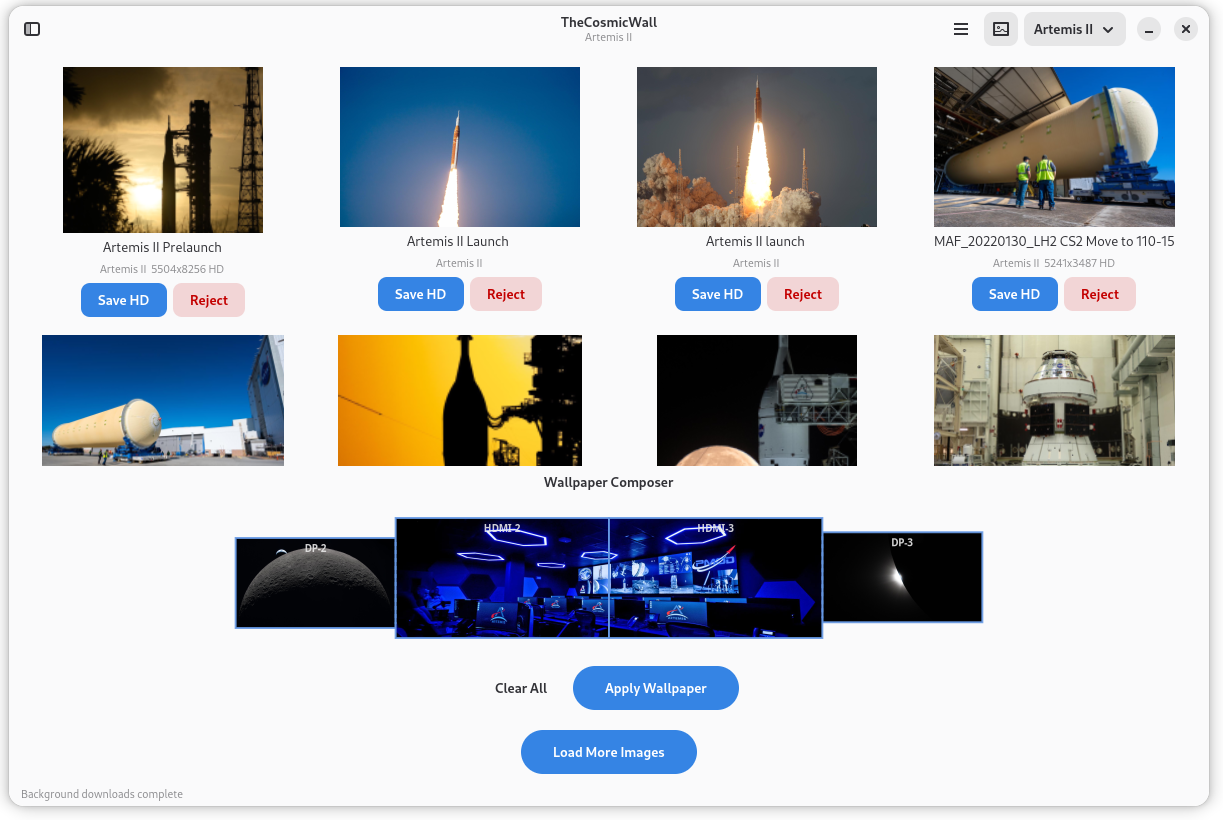
FlowBox grid with async download, progress bar, and image dimensions display. Smart filtering shows only images wide enough for your monitors.
Full-Resolution Preview
Double-click any thumbnail to open a full-resolution preview with all available metadata from the source.
Image Categorization
Auto-saved locally. Mark images as good or reject them — rejected images are blacklisted and deleted. Saved images appear in a sidebar with thumbnails.
Multi-Monitor Wallpaper Composition
Drag images onto monitor rectangles. Per-monitor (different image each), pair-spanned (one image across two adjacent monitors), or fully-spanned (single image across all). Aspect ratio preserved with center-crop.
Persistent Layout
Monitor assignments, pair spans, full-span mode, and active source all persist across restarts. Entries keyed by display connector — unplugging and reconnecting restores the image automatically.
NASA API Key Management
Default DEMO_KEY allows 30 requests/hour. Auto-detects rate limits and prompts for a free API key (1,000 requests/hour from api.nasa.gov).
Use Cases
Space Image Browsing
Explore stunning images from 9 astronomy sources — NASA missions, space telescopes, and ground-based observatories — in a modern GNOME interface.
Multi-Monitor Wallpaper Setup
Compose unique wallpapers for a multi-monitor desktop. Assign different images per monitor, span one image across a pair, or stretch a single panoramic image across all screens.
Curating a Space Collection
Browse, categorize, and save high-resolution space images. Build a personal collection with automatic local storage and thumbnail sidebar.
Desktop Customization
Use images from JWST, Hubble, ESO, or Chandra as desktop wallpapers with proper scaling and aspect ratio preservation.
User Manual
Quick Start
- Launch TheCosmicWall from GNOME Activities or terminal (
the-cosmicwall) - Select an image source from the dropdown in the header bar
- Browse the thumbnail gallery — images download asynchronously
- Double-click any thumbnail for a full-resolution preview
- Right-click and select "Set as Wallpaper" or use the monitor layout composer
Image Sources
| Source | Content | Resolution |
|---|---|---|
| NASA APOD | Daily curated astronomy picture | HD (varies) |
| NASA Library | 140,000+ NASA images, searchable | Original uploads |
| JWST (Webb) | James Webb Space Telescope | Original uploads |
| Artemis II | Crewed lunar flyby mission | Original uploads |
| ESA/Hubble | Hubble + JWST via ESA | Wallpaper3 CDN |
| ESO | VLT, ALMA, ELT ground-based | Wallpaper3 CDN |
| NOIRLab | Gemini, Rubin Observatory | Wallpaper3 CDN |
| Chandra X-ray | X-ray astronomy | Large JPG |
| NASA EPIC | Earth from L1 Lagrange point | 2048x2048 PNG |
Browsing Images
- Select a source from the header bar dropdown
- Thumbnails load asynchronously with a progress bar
- Ctrl+L loads more images from the current source
- F5 refreshes (clears and reloads)
- Ctrl+F focuses the search field (NASA Library source)
- Ctrl+B toggles the saved images sidebar
- Double-click a thumbnail for full-resolution preview with metadata
Managing Images
Right-click any thumbnail for options:
| Action | Description |
|---|---|
| Preview | Full-resolution preview with metadata |
| Info | Image metadata and dimensions |
| Save HD | Download and save the high-resolution version |
| Reject | Blacklist and delete the image |
| Set as Wallpaper | Apply to desktop via the monitor composer |
Saved images appear in the sidebar. Rejected images are permanently blacklisted.
Wallpaper Composition
The monitor panel at the bottom shows your physical monitor layout:
- Per-monitor: Drop an image on a monitor rectangle to assign it
- Pair-spanned: Drop in the dashed vertical gap between two adjacent monitors to span one image across both
- Fully spanned: Drop outside any monitor rectangle to span across all monitors
All scaling preserves the original aspect ratio (fit width, center-crop vertically). The composed wallpaper is applied via gsettings.
Keyboard Shortcuts
| Shortcut | Action |
|---|---|
Ctrl+L | Load more images |
F5 | Refresh (clear and reload) |
Ctrl+B | Toggle saved images sidebar |
Ctrl+F | Focus search field (NASA Library) |
Double-click | Full-resolution preview with metadata |
Right-click | Context menu |
NASA API Key
The default DEMO_KEY allows 30 requests per hour. For 1,000 requests/hour:
- Go to https://api.nasa.gov/
- Enter your name and email — the key is emailed instantly
- In the app: hamburger menu → "NASA API Key..." → paste and save
The app auto-detects when you hit the rate limit and prompts you.
Data Storage
~/.local/share/thecosmicwall/
├── images/       # Full-resolution saved images
├── thumbnails/   # Thumbnail cache
└── metadata/     # JSON metadata per image

~/.config/thecosmicwall/
├── settings.conf # API key, monitor assignments, active source
└── blacklist.json# Rejected image URLs