


TheWatchoverMQTT
Version 0.1.0
Distributed file monitoring with CLI backend and GTK4/Android frontends communicating via MQTT.
Features
Split Architecture
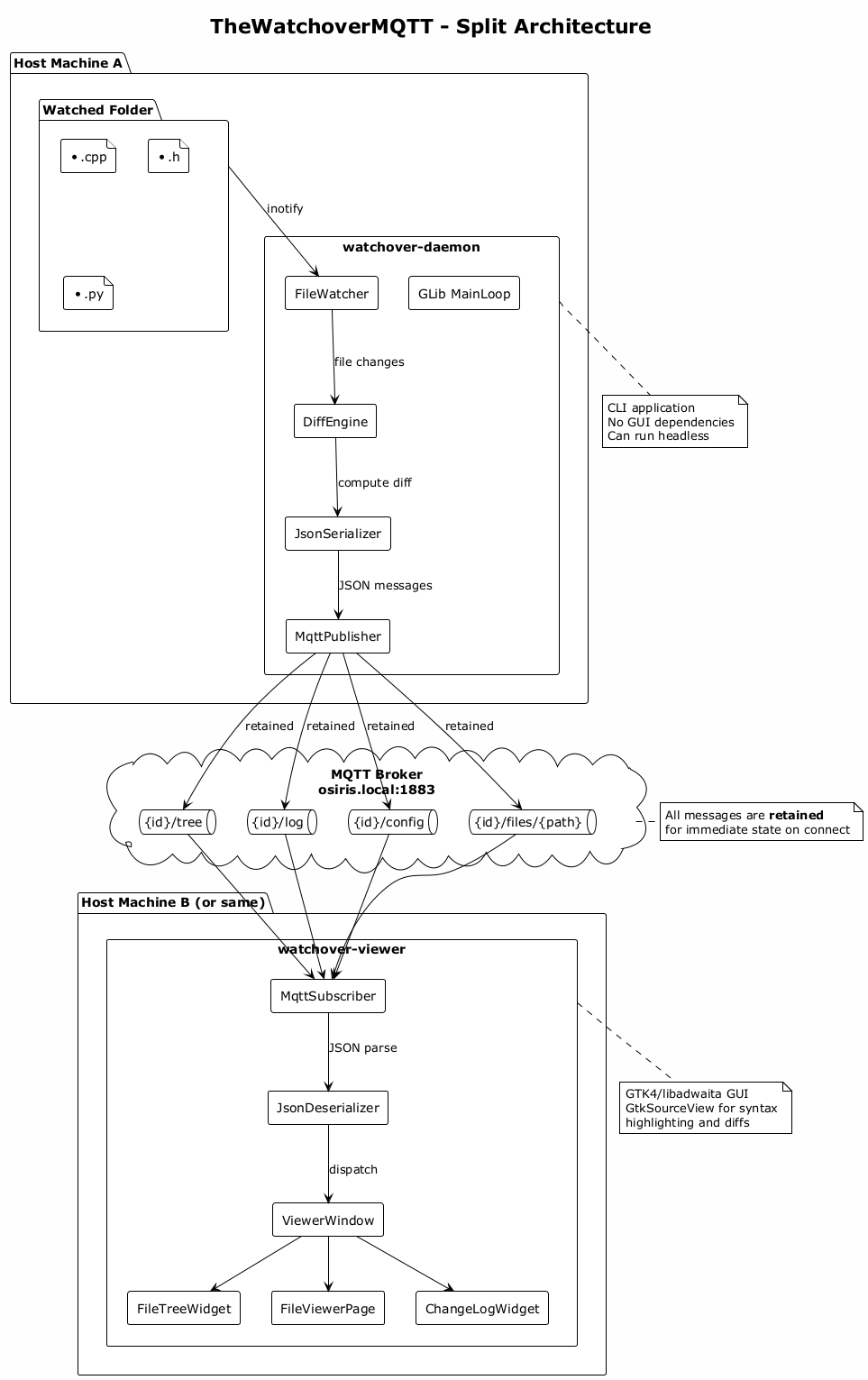
CLI daemon (publisher) monitors files and publishes changes; GTK4 viewer (subscriber) displays them. They communicate through any standard MQTT broker.
MQTT Protocol
Uses retained MQTT messages with BSON serialization and gzip compression. Topics include file tree, change log, instance config, and individual file diffs.
Real-time File Monitoring
The daemon uses inotify with recursive directory watching, debounce configuration, and atomic save handling (DELETE+CREATE sequences).
LCS Diff Engine
Baseline-based diff comparison with word-level highlighting. Added lines in green, removed in red, with dual-column line numbers.
Syntax Highlighting
GtkSourceView 5 provides automatic language detection for 300+ programming languages with Adwaita theme integration and minimap navigation.
Three-Pane Layout
File tree (left), tabbed file viewer with minimap (center), and chronological change log (right). All panes are resizable.
Auto-Discovery
The viewer automatically discovers running daemon instances on the MQTT broker. Select an instance to view its file tree and changes.
Android Viewer
Kotlin mobile client with Material Design 3 interface. Bottom navigation on phones, three-pane layout on tablets. Real-time file monitoring on mobile devices.
Multi-Language UI
Available in English, Italian, French, and German.
Use Cases
Remote Development Monitoring
Run the daemon on a development server, connect from your desktop or phone to watch file changes in real-time — no SSH tunnel required, just an MQTT broker.
Watching AI-Assisted Code Changes
Monitor your codebase while an AI assistant (Claude Code, Copilot, Cursor) makes changes on a remote machine. See every modification as it happens.
Team Collaboration
Multiple developers can subscribe to the same daemon instance to see file changes in real-time. Useful for pair programming or code reviews.
CI/CD Pipeline Monitoring
Run the daemon on a build server to watch compilation output, test results, and generated artifacts from your desktop or mobile device.
Cross-Platform Monitoring
Monitor files from the GTK4 desktop viewer on Linux or the Android app on your phone — same MQTT broker, same data.
Multi-Project Monitoring
Run multiple daemon instances with unique identifiers, each watching a different project. The viewer discovers and lists all available instances.
User Manual
Quick Start
Start the daemon:
watchover-daemon --id myproject --folder /path/to/project
Start the viewer:
- Launch watchover-viewer from GNOME Activities or terminal
- Click the server icon to connect to the MQTT broker
- The viewer will auto-discover running daemon instances
- Select an instance to view its file tree and changes
Daemon Configuration
Configuration file: ~/.config/watchover-daemon/config.ini
[Watch]
include=*.cpp;*.h;*.py;*.js
exclude=build/*;.git/*;node_modules/*
recursive=true

[MQTT]
host=osiris.local
port=1883

[Settings]
debounce_ms=200
max_log_entries=100
max_file_size_kb=1024
Command-line options:
| Option | Description |
|---|---|
--id, -i <id> | Instance identifier (required) |
--folder, -f <path> | Folder to watch (required) |
--config, -c <path> | Config file path |
--mqtt-host <host> | Override MQTT host |
--mqtt-port <port> | Override MQTT port |
MQTT Topics
Each daemon instance publishes to topics prefixed with its identifier:
| Topic | Description |
|---|---|
{id}/config | Instance configuration (retained) |
{id}/tree | Full file tree structure (retained) |
{id}/log | Recent change log entries (retained) |
{id}/files/{path} | File content and diffs (retained) |
All messages use BSON serialization with gzip compression. Messages are published as retained so new subscribers immediately receive the current state.
Viewer Window
Three-pane layout:
| Pane | Description |
|---|---|
| File Tree (left) | Directory structure with color-coded change states |
| File Viewer (center) | Tabbed viewer with syntax highlighting and diff |
| Change Log (right) | Chronological list of file changes |
Toolbar buttons:
| Button | Action |
|---|---|
| Connect | Open connection dialog to MQTT broker |
| Instance | Select which daemon instance to view |
| Modified only | Show only changed files in the tree |
| Auto-open | Automatically open tabs when files change |
File Tree
| Color | State | Meaning |
|---|---|---|
| Green | Created | A new file appeared |
| Orange | Modified | Content changed since baseline |
| Red | Deleted | File removed from disk |
| None | Unchanged | No changes detected |
- Directories expand/collapse
- Deleted files remain visible (marked red)
- Double-click to open in the viewer
- Modified only filter preserves directory structure
Android Viewer
The Android viewer provides the same functionality on mobile devices:
- Material Design 3 interface with dynamic theming
- Bottom navigation on phones (Tree, Viewer, Log)
- Three-pane layout on tablets
- Connection settings with broker host/port configuration
- Instance selection with auto-discovery
- Syntax highlighting for common languages
- Diff visualization with color highlighting
Minimum Android version: 11 (API 30).